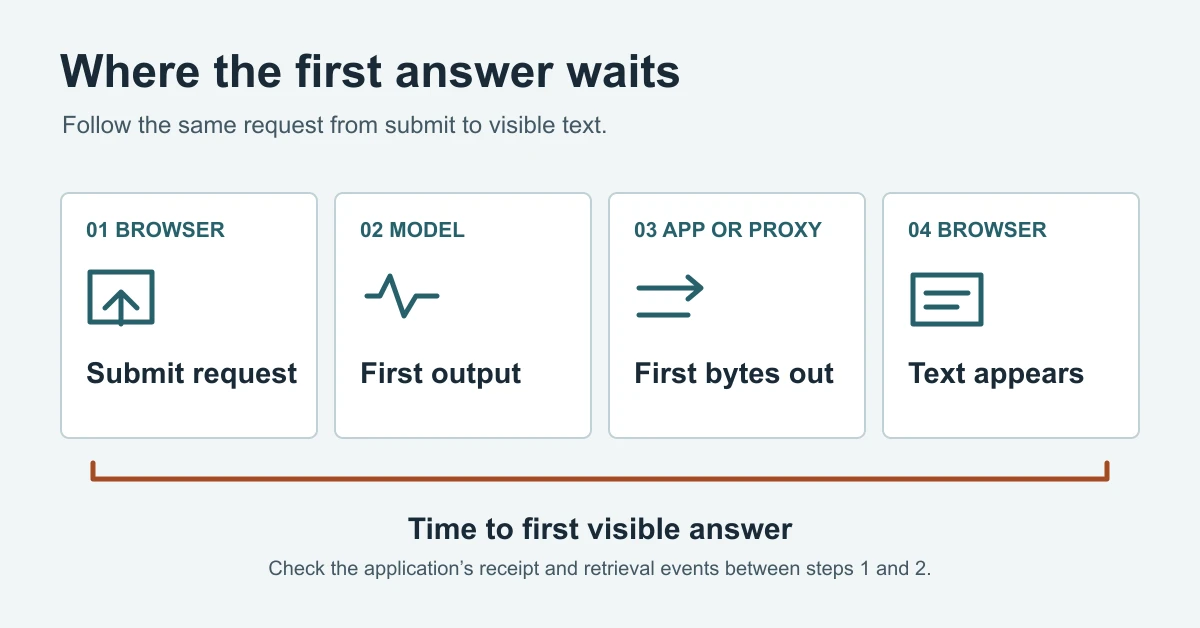

A Mexico City service desk can see a fast inference response in the provider dashboard while staff stare at a blank answer box. The model may have started generating on time. The delay can still sit in document retrieval, a proxy that buffers the stream, or the application that waits for the full response before drawing it.
Before adding compute or buying another network path, measure when the first usable answer appears on the screen. Compare that moment with the backend's first output for the same request. For AI inference in Mexico City, that comparison helps you decide which part of the existing deployment needs attention.
Mark four times on the same request
Use a test workflow that mirrors the production path and uses synthetic records. Set one request ID at the entrance. Measure time to first visible answer from the user's submit action, not from when the model server starts its timer. A blank progress frame or a typing indicator doesn't count. Record first actual answer content separately from the final answer.
| Checkpoint | What to capture | What it can help distinguish |
|---|---|---|
| Submit in the browser | Device, network, first request event and the time the first answer text renders | Whether the user waits longer than the server-side report suggests |
| Request at the application | Arrival, upstream lookup completion and the request sent to the model | Time spent before inference, including document retrieval or application queues |
| First model output | Model ID, first substantive output, final output and errors | How long the model took to start and then finish generating |
| First bytes forwarded | When answer content leaves the application or proxy for the user | A gap after the model starts, such as a buffered response |
Google Cloud's inference metrics guide distinguishes time to first token from overall latency and time per output token. Keep those metrics, but don't use them as substitutes for when text actually appears in the browser. Compare matched traces by request ID. Don't subtract a backend p95 from a client p95 and label the difference a network delay: those two percentile values may describe different requests.
Compare the office and mobile paths without changing the model
Suppose a help desk in Mexico City uses the same service from an office connection and on mobile. Run the same prompt set against the same endpoint, with the same retrieval configuration, model, output limit and timeout. Use short and longer requests, and record the time window and how many attempts produced a usable answer. Separate failures from successful response times instead of dropping them.
In an illustrative trace, the model starts producing content at about the same time from both networks, and the application forwards its first answer chunk promptly. The mobile browser starts showing text later. That finding would move the investigation toward the receiving path or the client. It would not, by itself, prove that the cellular carrier caused the delay. Compare when bytes arrive at the client with when the interface renders them. If bytes arrive promptly but the screen stays blank, look at the interface before changing routes.
Now consider a slow request from both networks. If the application spends most of its time waiting for a document lookup before calling the model, a faster inference server might miss the actual problem. Measure that lookup and the application queue separately. Repeat the test after changing one item so the team can see what changed, rather than attributing an improvement to several simultaneous changes.
Distinguish a network entrance from the place inference runs
DE-CIX lists Mexico City and Querétaro as connected exchange locations. That can inform a question for a carrier about available paths. It doesn't establish that your particular users reach your application through the exchange, that they're offered a private cloud connection, or that the model runs at that point of entry.
Ask the provider to identify the service entrance, the application location, the inference endpoint and the return path you can actually order. Record the connection in the test setup. If a proposed improvement changes both the route and the model location, test each change separately where practical. A region label alone won't tell you which part removed the wait.
Put the decision into the acceptance test
Agree on time to first visible answer and time to completion for each workload class, along with timeouts and error handling. Use sample sizes and test windows your team can defend. Keep the individual traces that explain the slow cases. Run the same comparison after a proxy, endpoint or application release that changes the stream.
Use the Mexico City data centers and colocation guide for facility and interconnection procurement. Use this trace to decide whether work on the facility, network, model or interface would address the actual wait. For help describing infrastructure capabilities to enterprise buyers, see Percepture's work with telecom and digital infrastructure providers.