
A prospect asks whether your document API accepts scanned PDFs. The answer says yes and cites your documentation. The citation is accurate for the latest API, but the prospect's customer is on the previous version, which only accepts files with a text layer. Both sets of instructions belong on your site. What went missing was the version boundary.
For AI tech companies that support more than one version, a practical answer engine optimization strategy is to publish a compatibility page before moving the documentation. A buyer should be able to find the right instructions without guessing which version a product page, example, or AI answer refers to.
Give the compatibility page one job
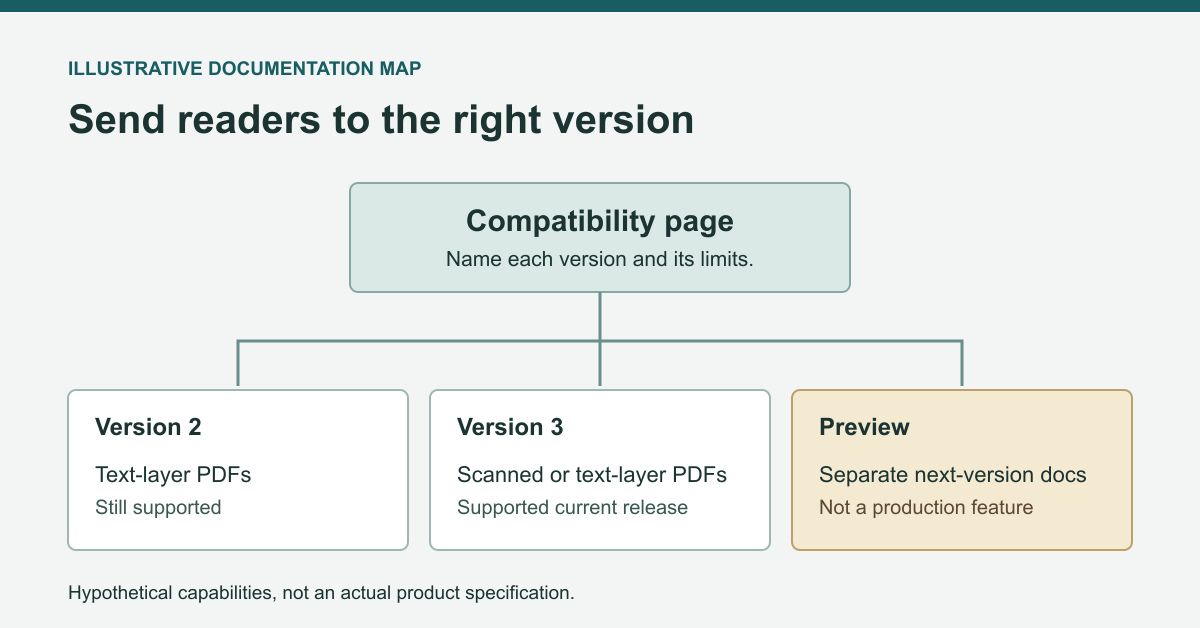
Use the page to answer which supported product version can do the work, under what conditions, and where the applicable instructions live. Put the version and its limits in the same sentence as the capability. A heading that says "PDF support" and a footnote about which versions can handle which files leave too much room for misunderstanding.
Start with a short map of the versions your company actually supports. The following product and capabilities are hypothetical. They illustrate the documentation decision, not the behavior of any deployed product.
Hypothetical product compatibility and documentation routes
| Reader's situation | What the compatibility page should say | Where to send the reader |
|---|---|---|
| New evaluation of version 3 | In this example, version 3 accepts both scanned and text-layer PDFs. | Version 3 input requirements, with examples for both input types. |
| Customer still using version 2 | Version 2 accepts PDFs with a text layer. A scanned PDF must be converted first. | Version 2 instructions and the supported migration path. |
| Team evaluating the next release | A proposed input type in preview is not part of either production version. | A clearly labeled preview page, separate from supported inputs. |
| Reader does not know their version | Confirm the deployed version before relying on an input claim. | The version-identification instructions, then the matching requirements. |
The page should link to version-specific instructions instead of copying every example into one document. Someone maintaining those examples can then correct the right page without leaving three inconsistent copies around the site.
Decide what each old URL should do
Before the migration, list the URLs people actually use to answer the buyer question: the product capability page, both requirements pages, the input example and any release note that announced the change. Record which audience each one serves after the move.
- The old version is still supported. Keep its instructions reachable. Label the version near the answer and link to the compatibility page. Do not redirect everyone to the latest instructions just because they look newer.
- The same instructions moved to a new address. Redirect to their specific replacement. Check that an existing bookmark opens the right version, not the documentation homepage.
- The version is retired and no replacement behaves the same way. Explain the support status and link to the relevant migration or replacement instructions. Avoid sending readers to a page that silently promises different behavior.
Docusaurus's versioning guide shows why the URL alone is an unreliable label: a project's newest published docs and its next-version docs can be stored and served differently. The documentation platform is not the point. Put supported version and release status where a reader can see them.
Google Search Central's redirects guidance distinguishes permanent from temporary moves and explains how Google uses redirects as a canonical signal. Use that guidance when pages really move. A redirect does not make two different product versions interchangeable or guarantee that an AI answer will change.
Check version pairs before the docs release
Give one reviewer the old URL, one the compatibility page, and one the current product page. Ask each to answer the same buyer question with the version withheld first, then with version 2 and version 3 named. Collect the answer and the supporting page or mark it unresolved. You are looking for a missing condition, not scoring how often the company is named.
When the question omits the version, a useful answer states the difference or shows how to check. "Yes, the API accepts scans" is incomplete until it names version 3. "Version 2 requires a text layer" must lead to the version 2 instructions, even if the new version is the default in your navigation.
Then check the public release from two directions: follow a saved bookmark into the older instructions, and start on the product page as a new evaluator. Both paths should lead to the right version and its limitation. If an example or navigation link still points to the wrong version, fix that path before calling the migration complete.
After the release, repeat any agreed AI-answer observations and preserve the dates and citations. An old answer may persist after the source has been corrected. Record the source change and the answer observation separately.
If your question is who should do the research, documentation, and recheck, use Percepture's AEO services guide for AI companies. To discuss a specific migration, bring one capability, its current public page, and the older instructions customers still rely on.

About Bob Generale
Bob Generale is President of Percepture, a digital marketing and public relations agency.